Best WordPress Developer Training Course in Coimbatore
Enroll now! Stuvels is a best Software Training Institute in Coimbatore, We provide Best WordPress Developer Training Course in Coimbatore with 100% placement. For more information about our Frontend training course, please visit our website or call us. We look forward to welcoming you to our learning community and helping you take the next step in your professional journey.
4.8 google Reviews
Best WordPress Developer Training Course in Coimbatore
Welcome to our esteemed training institute, where we offer specialized training in WordPress. WordPress is the leading content management system (CMS) globally, driving millions of websites and blogs. Our WordPress training program is designed to provide you with the skills and knowledge needed to create, manage, and customize WordPress websites effectively.
Whether you are a beginner looking to start your journey in web development or an experienced professional aiming to enhance your skills, our course will equip you with the expertise required to excel in the field.
Our WordPress training program is designed to provide you with the knowledge and skills needed to succeed in the field of web development. Whether you are just starting your career or looking to advance your current skills, our program is the perfect choice.
For more information or to enroll in our PHP training course, please visit our website or contact our admissions office. We look forward to welcoming you to our learning community and helping you take the next step in your professional journey. See our blog for more setails about course .

PRACTICAL LEARNINIG
PRACTICAL LEARNINIG
PROJECT GUIDANCE
PROJECT GUIDANCE
LIFE TIME COURSE
LIFE TIME COURSE
24x7
SUPPORT
24x7
SUPPORT
JOB GUATENTEED
JOB GUATENTEED
WordPress course
- What Will You Learn?
- Benefits
- FAQ's
Introduction to WordPress
- What is WordPress? Overview and History
- WordPress.com vs. WordPress.org
- Key Features and Benefits of WordPress
- Examples of WordPress Websites
Getting Started
- Setting Up a Local or Online WordPress Environment
- Installing WordPress
- Introduction to the WordPress Dashboard
- Understanding Themes, Plugins, and Widgets
WordPress Basics
- Creating and Managing Posts
- Creating and Managing Pages
- Using Categories and Tags
- Understanding the Media Library
- Setting Up Menus and Navigation
Working with Themes
- Choosing the Right Theme
- Installing and Activating Themes
- Customizing Themes
- Using the WordPress Customizer
- Editing Theme Settings
- Introduction to Child Themes
Plugins and Extensions
- What Are Plugins?
- Installing, Activating, and Deactivating Plugins
- Must-Have Plugins for WordPress Sites
- Using Plugins for SEO, Security, and Performance
Building a Website
- Structuring Your Website
- Designing a Homepage
- Creating an About Page and Contact Page
- Adding Testimonials and Portfolios
- Integrating Social Media
WordPress Security
- Common Security Risks in WordPress
- Best Practices for Securing Your WordPress Site
- Using Security Plugins
- Backup and Recovery Strategies
SEO for WordPress
- Introduction to Search Engine Optimization (SEO)
- Using SEO Plugins (e.g., Yoast SEO, Rank Math)
- Optimizing Content for SEO
- Understanding Permalinks and Meta Tags
- Submitting Your Site to Search Engines
E-Commerce with WordPress
- Introduction to WooCommerce
- Setting Up an Online Store
- Managing Products and Inventory
- Configuring Payment Gateways
- Creating a User-Friendly Checkout Process
Advanced WordPress Topics
- Custom Post Types and Taxonomies
- Introduction to Page Builders (e.g., Elementor, WPBakery)
- Adding Custom CSS and JavaScript
- Understanding WordPress Hooks: Actions and Filters
Managing and Maintaining WordPress
- Updating WordPress Core, Themes, and Plugins
- Performance Optimization
- Image Optimization
- Caching Plugins
- Monitoring Website Analytics
WordPress Troubleshooting
- Common Errors and How to Fix Them
- Debugging Techniques
- Restoring WordPress from Backups
The institute’s unique blend of experienced trainers, practical learning modules, and state-of-the-art facilities make it a preferred choice for aspiring tech enthusiasts. Whether you’re a beginner or an experienced professional, Stuvels has something tailored for everyone.
The students will be exposed to analytical and logical thinking.
- Develop and refine skill
The students will be provided the deep knowledge of programming.
- Gain confidence in IT career
One can self-realize the technological transformation from zero coding knowledge to coding expertise.
- Gain valuable work exprience , practical learning
The student will gain valuable work experience and also practical implementations thus developing a greater confidence. Courses are structured around live projects, giving students a hands-on experience that bridges the gap between theoretical learning and practical application
- Explore career path
The student will gain enough confidence to explore their career path.
- Work on live projects
The students will get a great opportunity to work with our development team in real time projects.
Stuvels has a dedicated placement cell that collaborates with leading IT companies in Coimbatore and beyond, helping students secure rewarding jobs. The students will get a good placement opportunity to kick-start their career in IT industry.
We also doing Best Intership in coimabtore for collage students.
What is WordPress?
WordPress is a popular content management system (CMS) used to create websites, blogs, and online stores. It is open-source, flexible, and user-friendly, making it suitable for both beginners and experienced web developers.
Do I need prior experience with coding to take the WordPress course?
No, prior coding experience is not required. Our course is designed for beginners, and we focus on teaching you how to use WordPress’s built-in features, themes, and plugins. However, some familiarity with basic web concepts can be helpful.
Will I learn how to create a website in this course?
Yes! By the end of the course, you will be able to create and launch your own fully functional WordPress website, including setting up pages, posts, and a blog, and customizing the design.
What tools will I need for this course?
You will need a computer with internet access. We recommend using a modern web browser (Google Chrome, Mozilla Firefox) and a code editor for advanced topics (if you plan to explore custom coding). You will also need access to a WordPress installation (either locally or via hosting).
Can I build an e-commerce website using WordPress?
Yes, you will learn how to set up an e-commerce website using WooCommerce, a powerful WordPress plugin. The course will cover product management, payment integration, and creating a user-friendly shopping experience.
How long will it take to complete the WordPress course?
Our WordPress course is typically designed to be completed in 6 to 12 weeks, depending on the pace and depth of the material. We offer both part-time and full-time options, so the duration may vary based on your schedule.
Will I get a certification after completing the course?
Yes, upon successful completion of the course and all assignments, you will receive a certificate of completion that you can showcase on your resume or LinkedIn profile.
Can I take this course if I am interested in blogging or personal websites?
Absolutely! This course is ideal for anyone who wants to create personal blogs, portfolios, or any type of content-driven website. You will learn how to set up a blog, publish posts, and manage content efficiently.
Is there any hands-on experience in the course?
Yes, our course is hands-on! You will have practical exercises, assignments, and projects that will allow you to work directly with WordPress. You’ll also have access to a sandbox environment where you can practice your skills.
What is the support like during the course?
We offer comprehensive support throughout the course. You can reach out to our instructors via email, discussion boards, or live Q&A sessions for clarification. We also provide a community forum where students can share insights and help each other.
What happens if I miss a class?
We understand that schedules may vary. All class materials, including recorded sessions, slides, and assignments, will be available for review at any time through our course platform. You can catch up on missed content at your convenience.
Do you offer any job placement assistance after the course?
While we do not guarantee job placement, we provide resources to help you get started in the field. This includes guidance on building a portfolio, improving your resume, and tips for freelancing or working with clients. We also help you connect with potential employers or freelance platforms.
Can I continue learning after completing the course?
Yes! After completing the basic WordPress course, you can explore advanced topics such as custom theme development, creating custom plugins, and advanced SEO techniques. We also offer follow-up courses and workshops.
What is the course fee?
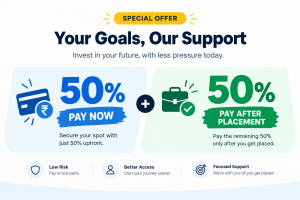
Please refer to the [course fees page] for up-to-date pricing details. We also offer payment plans, discounts for early enrollment, and occasional promotional offers.
How do I enroll in the course?
You can enroll directly on our website through the enrollment page, or contact our support team for assistance. We offer multiple intake dates throughout the year, so feel free to choose one that fits your schedule.
Is this course available online or in-person?
We offer both online and in-person classes. The online course is flexible, allowing you to learn from anywhere at your own pace. The in-person class is conducted at our training facility. Do you want to know more about wordpress developer course..?
Training Course Reviews
Posted on Google
 Govinth Renu
Trustindex verifies that the original source of the review is Google.
It is Very good training institute. This internship very useful to me.i learn in html,css and bootstrap.easy to understandPosted on Google Jayakodi GuruThis is good software training institute I am learning web development it easy to understand and I had gained much knowledge an this domainPosted on Google
 Barkavi.kIt really good software training institute in coimbatore I am learning web development in this institute Way of teaching is good and easy to understandPosted on Google
 Gauvishnu GauvishnuBest institute for learning in Coimbatore. Experienced and friendly staff. Before this training I had no idea about HTML, CCS and Bootstrap but now I have gained knowledge about HTML, CCS and Bootstrap.Posted on Google
 Shirivanth PDuring my Java Full Stack Development Training internship session at Best Software Training Institute in Coimbatore.Then I have gained knowledge in new tools and topics for creating a webpage.Posted on Google
 Vishnu PrasandhThis class gives more helpful for me in during placements and also it gives more benefit in providing solutions based on the problem statements. It helps for me to learn how to read a code.Posted on Google
 Avinash 18Easy to understand & knowing more about python I liked to do the coding very easy by that timePosted on Google
 Sunil KullanIn my point of view Stuvels is the best institute for learning in Coimbatore I have referred many institutions in Coimbatore but they way of teaching is very good and contents of courses and they provide Internet services and emi option for fees.Posted on Google
 PoojaThis intenship is very useful and improve your knowledge and good Teaching.Posted on Google
 Kanishka KaniThis internship very useful, improve skill and good guidance thanks for this opportunitiesLoad more